- Java 8 in Action : Lambdas, Streams, and Functional-style Programming
- AWS Certified Solutions Architect Official Study Guide: Associate Exam 1st Edition
- Head First Object Oriented Design and Analysis
- Algorithms (4th Edition) - This book is used in conjunction with Coursera's Algorithms 1 course
- Cracking the Coding Interview: 189 Programming Questions and Solutions 6th Edition
- Solr in Action 1st Edition

A blog about software development and whatever else I find interesting.
Showing posts with label solr. Show all posts
Showing posts with label solr. Show all posts
Thursday, May 25, 2017
Some books that I've really enjoyed...
A list of books that I've enjoyed:

Friday, August 14, 2015
Add and remove fields from Solr schema using Schema API...
Okay - I know what you're thinking. "How can I quickly update my Solr schema without having to go into the schema config file - perhaps using a rest API?" You can use the Solr Schema API, that's how!
I recently noticed that there is a Schema API in Solr 5.X that can be used to update the Solr schema. You need to have the schemaFactory set to use the "ManagedIndexSchemaFactory", and have the mutable property set to true. If you want to stop allowing the schema from being updated via the API, then you can change the mutable property to false.
Here are a few of the things that you can do with the schema API:
View the schema for a collection:
http://localhost:8983/solr/yourcollectionname/schema
View all of the fields in the schema:
http://localhost:8983/solr/yourcollectionname/schema/fields
Example output:
{
"responseHeader":{
"status":0,
"QTime":101
},
"fields":[
{
"name":"_text_",
"type":"text_general",
"multiValued":true,
"indexed":true,
"stored":false},
{
"name":"_version_",
"type":"long",
"indexed":true,
"stored":true},
{
"name":"id",
"type":"string",
"multiValued":false,
"indexed":true,
"required":true,
"stored":true,
"uniqueKey":true},
{
"name":"somefieldname",
"type":"lowercase",
"indexed":true,
"stored":true},
{
"name":"title",
"type":"strings"
}
]
}
View a specific field in the schema:
http://localhost:8983/solr/yourcollectionname/schema/fields/somefieldname
Example output:
{
"responseHeader":{
"status":0,
"QTime":1},
"field":{
"name":"somefieldname",
"type":"lowercase",
"indexed":false,
"stored":true
}
}
Now add a new field called "anotherfield" that is of type "text_en", stored, and indexed:
curl -X POST -H 'Content-type:application/json' --data-binary '{"add-field":{"name":"anotherfield","type":"text_en","stored":true,"indexed":true }}' http://localhost:8983/solr/yourcollectionname/schema
Now let's see that the field exists:
http://localhost:8983/solr/yourcollectionname/schema/fields/anotherfield
{
"responseHeader":
{
"status":0,
"QTime":1
},
"field":
{
"name":"anotherfield",
"type":"text_en",
"indexed":true,
"stored":true
}
}
Now let's delete the field:
curl -X POST -H 'Content-type:application/json' --data-binary '{"delete-field" : { "name":"anotherfield" }}' http://localhost:8983/solr/yourcollectionname/schema
And check to see that it is deleted:
http://localhost:8983/solr/yourcollectionname/schema/fields/anotherfield
{
"responseHeader":
{
"status":404,
"QTime":2
},
"error":
{
"msg":"Field 'anotherfield' not found.",
"code":404
}
}
There are other actions that you can do using the Schema API. Here are a few of the things that you can do using the Schema API:
- replace a field
- add and remove dynamic field patterns
- view dynamic fields
- and and remove field types
- view field types
I recently noticed that there is a Schema API in Solr 5.X that can be used to update the Solr schema. You need to have the schemaFactory set to use the "ManagedIndexSchemaFactory", and have the mutable property set to true. If you want to stop allowing the schema from being updated via the API, then you can change the mutable property to false.
Here are a few of the things that you can do with the schema API:
View the schema for a collection:
http://localhost:8983/solr/yourcollectionname/schema
View all of the fields in the schema:
http://localhost:8983/solr/yourcollectionname/schema/fields
Example output:
{
"responseHeader":{
"status":0,
"QTime":101
},
"fields":[
{
"name":"_text_",
"type":"text_general",
"multiValued":true,
"indexed":true,
"stored":false},
{
"name":"_version_",
"type":"long",
"indexed":true,
"stored":true},
{
"name":"id",
"type":"string",
"multiValued":false,
"indexed":true,
"required":true,
"stored":true,
"uniqueKey":true},
{
"name":"somefieldname",
"type":"lowercase",
"indexed":true,
"stored":true},
{
"name":"title",
"type":"strings"
}
]
}
View a specific field in the schema:
http://localhost:8983/solr/yourcollectionname/schema/fields/somefieldname
Example output:
{
"responseHeader":{
"status":0,
"QTime":1},
"field":{
"name":"somefieldname",
"type":"lowercase",
"indexed":false,
"stored":true
}
}
Now add a new field called "anotherfield" that is of type "text_en", stored, and indexed:
curl -X POST -H 'Content-type:application/json' --data-binary '{"add-field":{"name":"anotherfield","type":"text_en","stored":true,"indexed":true }}' http://localhost:8983/solr/yourcollectionname/schema
Now let's see that the field exists:
http://localhost:8983/solr/yourcollectionname/schema/fields/anotherfield
{
"responseHeader":
{
"status":0,
"QTime":1
},
"field":
{
"name":"anotherfield",
"type":"text_en",
"indexed":true,
"stored":true
}
}
Now let's delete the field:
curl -X POST -H 'Content-type:application/json' --data-binary '{"delete-field" : { "name":"anotherfield" }}' http://localhost:8983/solr/yourcollectionname/schema
And check to see that it is deleted:
http://localhost:8983/solr/yourcollectionname/schema/fields/anotherfield
{
"responseHeader":
{
"status":404,
"QTime":2
},
"error":
{
"msg":"Field 'anotherfield' not found.",
"code":404
}
}
There are other actions that you can do using the Schema API. Here are a few of the things that you can do using the Schema API:
- replace a field
- add and remove dynamic field patterns
- view dynamic fields
- and and remove field types
- view field types
Saturday, March 21, 2015
Using CursorMark for deep paging in Solr
Have you ever had to search through 100 million XML blobs to identify which XML blobs had some specific data (or, in my case, was missing some data)? It takes forever, and it's not very fun. I had a situation at work where it looked like I was going to have to do just that. Fortunately, we have the same data (more or less) in Solr cores. I just needed to do a NOT query on a specific field.
The Solr documentation suggests that you use a CursorMark parameter in your query if you need to page through more than a thousand records.
The following is an example of using CursorMark using SolrJ. The query will return all documents that do not have data for targetField. It then loops through the matches using the cursorMark parameter as a way to tell solr where to retrieve the next set of matches. One of the conditions of using cursorMark to page through results is that you need to sort on a unique field. The schema we are using has a unique field named "uid".
Something to note is that I had to explicitly set "timeAllowed" to 0 to say that I didn't want any time restrictions on the query.
Yonik Seeley made an interesting point in his Solr 'n Stuff blog about using cursorMark. You can change the returned fields, the facet fields, and number of rows returned, for a specific cursorMark since the cursorMark contains the state of the current search - the state isn't stored server-side. This makes it very easy for a client to allow a user to vary their experience while they page through results. This feels very similar to how you page through results using MySQL and other databases.
import org.apache.solr.client.solrj.SolrQuery;
import org.apache.solr.client.solrj.SolrServer;
import org.apache.solr.client.solrj.SolrServerException;
import org.apache.solr.client.solrj.impl.HttpSolrServer;
import org.apache.solr.client.solrj.response.QueryResponse;
import org.apache.solr.common.SolrDocument;
import org.apache.solr.common.SolrDocumentList;
import org.apache.solr.common.params.CursorMarkParams;
import java.io.*;
import java.util.zip.ZipEntry;
import java.util.zip.ZipOutputStream;
public class FindMissingData {
private static final int MAX_ALLOWED_ROWS=1000;
private static final String URL_PREFIX="http://somesolrserver:8983/solr/thecore";
private static final String ZIP_ENTRY_NAME="TheData.txt";
private static final String UNIQUE_ID_FIELD="uid";
private static final String SOLR_QUERY="NOT targetField:[* TO *]";
public static void main(String[] args) {
if (args.length != 2) {
System.out.println("java FindMissingData <rows per batch - max is 1000> <output zip file>");
}
int maxRows = Integer.parseInt(args[0]);
String outputFile = args[1];
// Delete zip file if it already exists - going to recreate it anyway
File f = new File(outputFile);
if(f.exists() && !f.isDirectory()) {
f.delete();
}
FindMissingData.writeIdsForMissingData(outputFile, maxRows);
}
public static void writeIdsForMissingData(String outputFile, int maxRowCount) {
if (maxRowCount > MAX_ALLOWED_ROWS)
maxRowCount = MAX_ALLOWED_ROWS;
FileOutputStream fos = null;
ZipOutputStream zos = null;
try {
fos = new FileOutputStream(outputFile, true);
zos = new ZipOutputStream(fos);
zos.setLevel(9);
queryForMissingData(maxRowCount, zos);
} catch (Exception e) {
e.printStackTrace();
} finally {
if (zos != null) {
try {
zos.flush();
zos.close();
} catch (Exception e) {}
}
if (fos != null) {
try {
fos.flush();
fos.close();
} catch (Exception e) {}
}
}
}
private static void queryForMissingData(int maxRowCount, ZipOutputStream zos) throws IOException {
ZipEntry zipEntry = new ZipEntry(ZIP_ENTRY_NAME);
zos.putNextEntry(zipEntry);
SolrServer server = new HttpSolrServer(URL_PREFIX);
SolrQuery q = new SolrQuery(SOLR_QUERY);
q.setFields(UNIQUE_ID_FIELD);
q.setRows(maxRowCount);
q.setSort(SolrQuery.SortClause.desc(UNIQUE_ID_FIELD));
// You can't use "TimeAllowed" with "CursorMark"
// The documentation says "Values <= 0 mean
// no time restriction", so setting to 0.
q.setTimeAllowed(0);
String cursorMark = CursorMarkParams.CURSOR_MARK_START;
boolean done = false;
QueryResponse rsp = null;
while (!done) {
q.set(CursorMarkParams.CURSOR_MARK_PARAM, cursorMark);
try {
rsp = server.query(q);
} catch (SolrServerException e) {
e.printStackTrace();
return;
}
writeOutUniqueIds(rsp, zos);
String nextCursorMark = rsp.getNextCursorMark();
if (cursorMark.equals(nextCursorMark)) {
done = true;
} else {
cursorMark = nextCursorMark;
}
}
}
private static void writeOutUniqueIds(QueryResponse rsp, ZipOutputStream zos) throws IOException {
SolrDocumentList docs = rsp.getResults();
for(SolrDocument doc : docs) {
zos.write(
String.format("%s%n",
doc.get("uid").toString()).getBytes()
);
}
}
}
The Solr documentation suggests that you use a CursorMark parameter in your query if you need to page through more than a thousand records.
The following is an example of using CursorMark using SolrJ. The query will return all documents that do not have data for targetField. It then loops through the matches using the cursorMark parameter as a way to tell solr where to retrieve the next set of matches. One of the conditions of using cursorMark to page through results is that you need to sort on a unique field. The schema we are using has a unique field named "uid".
Something to note is that I had to explicitly set "timeAllowed" to 0 to say that I didn't want any time restrictions on the query.
Yonik Seeley made an interesting point in his Solr 'n Stuff blog about using cursorMark. You can change the returned fields, the facet fields, and number of rows returned, for a specific cursorMark since the cursorMark contains the state of the current search - the state isn't stored server-side. This makes it very easy for a client to allow a user to vary their experience while they page through results. This feels very similar to how you page through results using MySQL and other databases.
import org.apache.solr.client.solrj.SolrQuery;
import org.apache.solr.client.solrj.SolrServer;
import org.apache.solr.client.solrj.SolrServerException;
import org.apache.solr.client.solrj.impl.HttpSolrServer;
import org.apache.solr.client.solrj.response.QueryResponse;
import org.apache.solr.common.SolrDocument;
import org.apache.solr.common.SolrDocumentList;
import org.apache.solr.common.params.CursorMarkParams;
import java.io.*;
import java.util.zip.ZipEntry;
import java.util.zip.ZipOutputStream;
public class FindMissingData {
private static final int MAX_ALLOWED_ROWS=1000;
private static final String URL_PREFIX="http://somesolrserver:8983/solr/thecore";
private static final String ZIP_ENTRY_NAME="TheData.txt";
private static final String UNIQUE_ID_FIELD="uid";
private static final String SOLR_QUERY="NOT targetField:[* TO *]";
public static void main(String[] args) {
if (args.length != 2) {
System.out.println("java FindMissingData <rows per batch - max is 1000> <output zip file>");
}
int maxRows = Integer.parseInt(args[0]);
String outputFile = args[1];
// Delete zip file if it already exists - going to recreate it anyway
File f = new File(outputFile);
if(f.exists() && !f.isDirectory()) {
f.delete();
}
FindMissingData.writeIdsForMissingData(outputFile, maxRows);
}
public static void writeIdsForMissingData(String outputFile, int maxRowCount) {
if (maxRowCount > MAX_ALLOWED_ROWS)
maxRowCount = MAX_ALLOWED_ROWS;
FileOutputStream fos = null;
ZipOutputStream zos = null;
try {
fos = new FileOutputStream(outputFile, true);
zos = new ZipOutputStream(fos);
zos.setLevel(9);
queryForMissingData(maxRowCount, zos);
} catch (Exception e) {
e.printStackTrace();
} finally {
if (zos != null) {
try {
zos.flush();
zos.close();
} catch (Exception e) {}
}
if (fos != null) {
try {
fos.flush();
fos.close();
} catch (Exception e) {}
}
}
}
private static void queryForMissingData(int maxRowCount, ZipOutputStream zos) throws IOException {
ZipEntry zipEntry = new ZipEntry(ZIP_ENTRY_NAME);
zos.putNextEntry(zipEntry);
SolrServer server = new HttpSolrServer(URL_PREFIX);
SolrQuery q = new SolrQuery(SOLR_QUERY);
q.setFields(UNIQUE_ID_FIELD);
q.setRows(maxRowCount);
q.setSort(SolrQuery.SortClause.desc(UNIQUE_ID_FIELD));
// You can't use "TimeAllowed" with "CursorMark"
// The documentation says "Values <= 0 mean
// no time restriction", so setting to 0.
q.setTimeAllowed(0);
String cursorMark = CursorMarkParams.CURSOR_MARK_START;
boolean done = false;
QueryResponse rsp = null;
while (!done) {
q.set(CursorMarkParams.CURSOR_MARK_PARAM, cursorMark);
try {
rsp = server.query(q);
} catch (SolrServerException e) {
e.printStackTrace();
return;
}
writeOutUniqueIds(rsp, zos);
String nextCursorMark = rsp.getNextCursorMark();
if (cursorMark.equals(nextCursorMark)) {
done = true;
} else {
cursorMark = nextCursorMark;
}
}
}
private static void writeOutUniqueIds(QueryResponse rsp, ZipOutputStream zos) throws IOException {
SolrDocumentList docs = rsp.getResults();
for(SolrDocument doc : docs) {
zos.write(
String.format("%s%n",
doc.get("uid").toString()).getBytes()
);
}
}
}
Thursday, October 23, 2014
Using SolrNet (0.4.0.2002) and AutoMapper...
If you're using Solr and you prefer to use .Net, then SolrNet is a great way to go. It's easy to use whether your indexing documents, querying for documents, or both.
Here is an example using Solr 4.10.1, SolrNet 0.4.0.2002, and AutoMapper.
I installed Solr 4.10.1, and used the default example "collection1" core for this example.
I created a POCO for the example and cleverly named it SolrDoc. I only bothered with a few of the values that are defined in the schema used in the collection1 core:
And created another POCO to act as a domain object (only to show how you can map from the Solr document), and named it SolrItem:
The following code isn't necessary for use with Solr, but it is necessary for creating the AutoMapper mapping between SolrDoc and SolrItem. Perhaps you won't need to map your Solr documents to some other contract object, but if you do have that need then AutoMapper is easy to use.
One way that AutoMapper can be used is to map between public and private views of data. As an example, you might have an API that allows users to view either detailed or summary user info. Your private model of the user data can have all user information and you can have AutoMapper map the user info to summary or detailed user info objects that are returned to the user. I included the AutoMapper usage as a way to show that you can easily get the Solr documents and then map them to whatever form you might need.
Here is the code that configures AutoMapper's source to destination mapping.
Here is the code that indexes a document into Solr, and then queries Solr for all documents. The foreach loop is where the SolrDoc is mapped to a SolrItem.
Here is an example using Solr 4.10.1, SolrNet 0.4.0.2002, and AutoMapper.
I installed Solr 4.10.1, and used the default example "collection1" core for this example.
public class SolrDoc
{
    [SolrUniqueKey("id")]
    public string Id { get; set; }

    [SolrField("sku")]
    public string Sku { get; set; }

    [SolrField("name")]
    public string Name { get; set; }

    [SolrField("cat")]
    public List Categories { get; set; }

}
And created another POCO to act as a domain object (only to show how you can map from the Solr document), and named it SolrItem:
public class SolrItem
{
    public string Identifier { get; set; }
    public string Sku { get; set; }
    public string Name { get; set; }
    public List Cats { get; set; }
    public override string ToString()
    {
        var sb = new StringBuilder(
                 string.Format("Identifier: {0}, SKU: {1}, Name: {2}",
                                Identifier, Sku, Name));
        if (Cats != null)
        {
            sb.Append("\nCategories:");
            foreach (var category in Cats)
            {
                sb.Append(string.Format("\n\t{0}", category));
            }
        }
        return sb.ToString();
    }
}
The following code isn't necessary for use with Solr, but it is necessary for creating the AutoMapper mapping between SolrDoc and SolrItem. Perhaps you won't need to map your Solr documents to some other contract object, but if you do have that need then AutoMapper is easy to use.
One way that AutoMapper can be used is to map between public and private views of data. As an example, you might have an API that allows users to view either detailed or summary user info. Your private model of the user data can have all user information and you can have AutoMapper map the user info to summary or detailed user info objects that are returned to the user. I included the AutoMapper usage as a way to show that you can easily get the Solr documents and then map them to whatever form you might need.
Here is the code that configures AutoMapper's source to destination mapping.
public static void InitMappings()
{
    Mapper.CreateMap()
        .ForMember(dest => dest.Cats, opt => opt.MapFrom(src => src.Categories))
        .ForMember(dest => dest.Identifier, opt => opt.MapFrom(src => src.Id));

}
Here is the code that indexes a document into Solr, and then queries Solr for all documents. The foreach loop is where the SolrDoc is mapped to a SolrItem.
static void Main(string[] args)
{
    // Set up the automapper mapping
    InitMappings();

    // Point to the Solr server that was started using the Solr example
    // of "java -jar start.jar"
    Startup.Init<SolrDoc>("http://localhost:8983/solr/collection1");

    // Get an instance of the Solr service that will map Solr documents to
    // a POCO of type SolrDoc
    var solr = ServiceLocator.Current.GetInstance<ISolrOperations<SolrDoc>>();

    // Create a SolrDoc to index into Solr
    var doc = new SolrDoc
    {
        Id = Guid.NewGuid().ToString(),
        Name = "Some SolrDoc",
        Sku = "Some_Sku",
        Categories = new List {"cat1", "cat2", "cat3"}
    };

    // Index and commit the doc
    solr.Add(doc);
    solr.Commit();

    // Query for all documents
    var results = solr.Query(new SolrQueryByField("id", "*"));

    // Loop through all results
    foreach (var result in results)
    {
        var solrItem = Mapper.Map<SolrItem>(result);
        Console.WriteLine(solrItem);
    }
}
Tuesday, February 19, 2013
Solr - HTMLStripCharFilter...
I am attempting to store a bit of data that I fetch from a website in Solr. The data sometimes has HTML markup, so I decided to use the HTMLStripCharFilterFactory in the fields analyzer.
Here is an example of the field type that I created:
<fieldType name="strippedHtml" class="solr.TextField">
<analyzer>
<charFilter class="solr.HTMLStripCharFilterFactory"/>
<tokenizer class="solr.WhitespaceTokenizerFactory"/>
<filter class="solr.LowerCaseFilterFactory" />
</analyzer>
</fieldType>
I used the field type of strippedHtml in a field called itemDescription, and when I do a search after indexing some data I can see that the itemDescription contains data that still has HTML markup. I used the analyzer tab in Solr to see what would happen on index of HTML data, and I could see that none of the markup appears to be stripped out.
It turns out that most of the HTML was encoded so that the angle bars are replaced with the escaped values. I will need to find a way to remove the escaped values.
Here is an example of the field type that I created:
<fieldType name="strippedHtml" class="solr.TextField">
<analyzer>
<charFilter class="solr.HTMLStripCharFilterFactory"/>
<tokenizer class="solr.WhitespaceTokenizerFactory"/>
<filter class="solr.LowerCaseFilterFactory" />
</analyzer>
</fieldType>
I used the field type of strippedHtml in a field called itemDescription, and when I do a search after indexing some data I can see that the itemDescription contains data that still has HTML markup. I used the analyzer tab in Solr to see what would happen on index of HTML data, and I could see that none of the markup appears to be stripped out.
It turns out that most of the HTML was encoded so that the angle bars are replaced with the escaped values. I will need to find a way to remove the escaped values.
Sunday, November 25, 2012
Solr - Solr .Net Client
I was looking for Solr .Net clients and found SolrNet. The SolrNet page has links for downloading the binaries, and it also has a link to the git repository.
I downloaded the SolrNet source code so I could compare the performance of indexing documents using the SolrNet and SolrJ clients, and then built the code. Next, I created a simple console application and referenced the SolrNet library. I then created a method that was basically a copy of the Java code I used (while using SolrJ) for reading in a CSV file, and indexing batches of "documents". The SolrJ version used POJOs (Plain Old Java Objects) with annotations specifying which Solr fields that the properties map to. The SolrNet version used POCOs (Plain Old CLR Objects) with annotations specificying which Solr fields that the properties map to.
Here is an example of the POCO I used:
public class TestRecord
{
[SolrUniqueKey("id")]
public string ID { get; set; }
[SolrField("lookupids")]
public List<int> LookupIDs { get; set; }
}
// The solr server was initialized earlier in the code using
// the following line of code:
// Startup.Init<TestRecord>("http://localhost:8983/solr");
public static void AddValues(List<TestRecord> testRecords)
{
var solr = ServiceLocator.Current.GetInstance<ISolrOperations<TestRecord>>();
solr.AddRange(testRecords);
solr.Commit();
}
It seems to index the data about as fast as the SolrJ code - which isn't terribly surprising. It appeared that it was slightly slower, but I will need to run multiple tests of varying batch sizes to see how similar or different the results are between SolrNet and SolrJ.
It took ~2.5 minutes to index 100000 documents when using batches of 100 test records, ~50 seconds for batches of 1000 test records, and ~45 seconds for batches of 10000 test records.
SolrNet is very easy to write code for querying against, or indexing into, a Solr index. I was very pleased!
I downloaded the SolrNet source code so I could compare the performance of indexing documents using the SolrNet and SolrJ clients, and then built the code. Next, I created a simple console application and referenced the SolrNet library. I then created a method that was basically a copy of the Java code I used (while using SolrJ) for reading in a CSV file, and indexing batches of "documents". The SolrJ version used POJOs (Plain Old Java Objects) with annotations specifying which Solr fields that the properties map to. The SolrNet version used POCOs (Plain Old CLR Objects) with annotations specificying which Solr fields that the properties map to.
Here is an example of the POCO I used:
public class TestRecord
{
[SolrUniqueKey("id")]
public string ID { get; set; }
[SolrField("lookupids")]
public List<int> LookupIDs { get; set; }
}
Here is an example of the code that indexed the values of the test records in batches:
// the following line of code:
// Startup.Init<TestRecord>("http://localhost:8983/solr");
public static void AddValues(List<TestRecord> testRecords)
{
var solr = ServiceLocator.Current.GetInstance<ISolrOperations<TestRecord>>();
solr.AddRange(testRecords);
solr.Commit();
}
It seems to index the data about as fast as the SolrJ code - which isn't terribly surprising. It appeared that it was slightly slower, but I will need to run multiple tests of varying batch sizes to see how similar or different the results are between SolrNet and SolrJ.
It took ~2.5 minutes to index 100000 documents when using batches of 100 test records, ~50 seconds for batches of 1000 test records, and ~45 seconds for batches of 10000 test records.
SolrNet is very easy to write code for querying against, or indexing into, a Solr index. I was very pleased!
Friday, November 23, 2012
Solr - Indexing Data Using SolrJ and addBeans
So far it looks like indexing data using SolrJ is considerably slower than indexing data using the update handler and a local CSV file. It took about 36 to 40 seconds to index 100000 documents using SolrServer.addBeans() compared to about 17 to 18 seconds using the update handler and a local CSV file.
The code using SolrJ, listed below, was running on the same machine as Solr.
public static void IndexBeanValues(ListtestRecords) throws IOException, SolrServerException { HttpSolrServer server = new HttpSolrServer("http://localhost:8983/solr"); server.addBeans(testRecords); server.commit(); }
I tried passing in an instance to SolrServer, but it didn't make any noticeable difference for timing. It might make more of a difference instantiating a new instance of SolrServer for each batch if the Java code using SolrJ is running on a different machine than the Solr server being targeted.
Refer to this post for a more detailed code example using SolrJ and addBeans.
Refer to this post for a more detailed code example using SolrJ and addBeans.
Solr - Indexing Data Using SolrJ
I think I found one of the slowest ways possible to index data into Solr. I'm looking into various ways to index data into Solr:
The method looks like this:
public static void IndexValues(TestRecord[] testRecords)
throws IOException, SolrServerException {
HttpSolrServer server = new HttpSolrServer("http://localhost:8983/solr");
for(int i = 0; i < testRecords.length; ++i) {
SolrInputDocument doc = new SolrInputDocument();
doc.addField("id", testRecords[i].getId());
for (Integer value : testRecords[i].getLookupIds()) {
doc.addField("lookupids", value);
}
server.add(doc);
if(i%100==0) server.commit(); // periodically flush
}
server.commit();
}
I'll have to try something similar, but using beans. It seems like it could be a bit faster if I used the addBeans method to add multiple documents at once.
- indexing text files local to the server that Solr is running on using the update handler
- indexing data using an app using SolrJ that is running on the same server as Solr
- indexing data using an app using SolrJ that is on a different machine on the same network that the Solr server is on
The method looks like this:
public static void IndexValues(TestRecord[] testRecords)
throws IOException, SolrServerException {
HttpSolrServer server = new HttpSolrServer("http://localhost:8983/solr");
for(int i = 0; i < testRecords.length; ++i) {
SolrInputDocument doc = new SolrInputDocument();
doc.addField("id", testRecords[i].getId());
for (Integer value : testRecords[i].getLookupIds()) {
doc.addField("lookupids", value);
}
server.add(doc);
if(i%100==0) server.commit(); // periodically flush
}
server.commit();
}
Wednesday, November 21, 2012
Solr - Indexing Local CSV Files
As part of my investigation into all things Solr, and in particular the indexing of data into Solr cores, it occurred to me that indexing local files should be much faster than sending bits of data across a network to be indexed. I am going to test the following:
Here is an example of the output data:
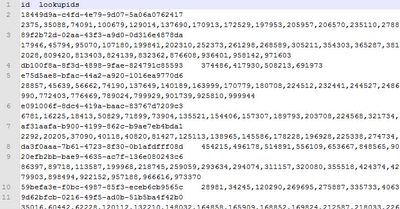
The data is stored in a character separated value file with just two columns. The first line of the data file lists the fields that the data will be indexed into, and the fields names are separated using the same separator that is used to divide the columns of data. The first column is mapped to the schema's id field, and the second column is mapped to the schema's lookupids field.
I modified the schema.xml to add a field named "lookupids", set the type = "int", and set multivalued = "true".
I copied a file named testdata.txt to the exampledocs directory, and then imported the data using this URL:
http://localhost:8983/solr/update/csv?commit=true&separator=%09&f.lookupids.split=true&f.lookupids.separator=%2C&stream.file=exampledocs/testdata.txt
I found the information on what to use in the URL here: http://wiki.apache.org/solr/UpdateCSV
The parameters:
<response>
</response>
Next I'll try indexing the same file using SolrJ on the same machine that is running Solr.
- indexing text files local to the server that Solr is running on using the update handler
- indexing data using an app using SolrJ that is running on the same server as Solr
- indexing data using an app using SolrJ that is on a different machine on the same network that the Solr server is on
Here is an example of the output data:

The data is stored in a character separated value file with just two columns. The first line of the data file lists the fields that the data will be indexed into, and the fields names are separated using the same separator that is used to divide the columns of data. The first column is mapped to the schema's id field, and the second column is mapped to the schema's lookupids field.
I modified the schema.xml to add a field named "lookupids", set the type = "int", and set multivalued = "true".
I copied a file named testdata.txt to the exampledocs directory, and then imported the data using this URL:
http://localhost:8983/solr/update/csv?commit=true&separator=%09&f.lookupids.split=true&f.lookupids.separator=%2C&stream.file=exampledocs/testdata.txt
I found the information on what to use in the URL here: http://wiki.apache.org/solr/UpdateCSV
The parameters:
- commit - The commit parameter being set to true will tell Solr to commit the changes after all the records in the request have been indexed.
- separator - The separator is set to be a TAB character (%09 refers to ASCII value for the TAB character).
- f.lookupids.split - The "f" is shorthand for field, and the field that is referenced is the "lookupids" field. This parameter tells Solr to split the specified field into mutliple values.
- f.lookupids.separator - The f.lookupids.separator parameter tells Solr to split the lookupids using the comma.
- stream.file - The stream.file tells Solr to stream the file contents from the local file found at "exampledocs/testdata.txt".
<response>
<lst name="responseHeader">
</lst>
<int name="status">
0
</int>
<int name="QTime">
17033
</int>Next I'll try indexing the same file using SolrJ on the same machine that is running Solr.
Tuesday, November 20, 2012
Solr - Querying with SolrJ
I added a method, cleverly named FindIds, to my test code that will find the unique IDs by doing a search on lookup IDs that are in a range from 0 to 10000. The query string looks like this:
"lookupids:[0 TO 10000]"
Even though the query is incredibly simple, I used the Solr admin page to test the query first. That way I could know what to expect to see from SolrJ. If I got different results from SolrJ, then I would know I that I would need to investigate to see why there was a difference.
Here is the code used:
public static void main(String[] args) {
ArrayList<String> ids = SolrIndexer.FindIds("lookupids:[0 TO 10000]");
for (String id : ids) {
System.out.printf("%s%n", id);
}
}
public static ArrayList<String> FindIds(String searchString) {
ArrayList<String> ids = new ArrayList<String>();
int startPosition = 0;
try {
SolrServer server = new HttpSolrServer("http://localhost:8983/solr");
SolrQuery query = new SolrQuery();
query.setQuery(searchString);
query.setStart(startPosition);
query.setRows(20);
QueryResponse response = server.query(query);
SolrDocumentList docs = response.getResults();
while (docs.size() > 0) {
startPosition += 20;
for(SolrDocument doc : docs) {
ids.add(doc.get("id").toString());
}
query.setStart(startPosition);
response = server.query(query);
docs = response.getResults();
}
} catch (SolrServerException e) {
e.printStackTrace();
}
return ids;
}
If you don't set the number of rows to be returned using query.setRows(), then the default number of rows to be returned will be used. The default used in the Solr example config is 10.
If the query results in nothing being found, then the SolrDocumentList is instantiated with 0 items. If there is an error with the query string, then an Exception will be thrown.
Something nice to add is a sort field. ie, query.setSortField("id", SolrQuery.ORDER.asc);
There are still some areas that I want to explore with SolrJ, so I will be posting more in the near future.
Monday, November 19, 2012
Solr - Indexing data using SolrJ
I'm using Solr at work, so I've been experimenting at home with various ways to index data into Solr. The latest method I tried using is SolrJ.
The Setup
I have Solr set up on my Windows 7 box - I just downloaded the Solr 4.0 zip from http://www.apache.org/dyn/closer.cgi/lucene/solr/4.0.0. I'm using IntelliJ Community Edition, so I created a new project and then added references to the necessary jar files by going to the Project Settings | Libraries section. I clicked the + sign, and picked "Java", and then selected all of the SolrJ related jars. SolrJ is distributed with Solr, and the related jar files for using SolrJ can be found in %SOLR_HOME%\dist and %SOLR_HOME%\dist\solrj-lib.
The Code
Using SolrJ to index data into Solr is amazingly simple. The sample code found at solrtutorial.com is almost useable as copy and paste. The version of Solr that the solrjtutorial site is targeting is for a version older than 4.0. Everything will work as long as you change the import for CommonsHttpSolrServer to HttpSolrServer. Of course you will also want to use field names that match your schema, but if you use the example solr instance (and therefore the example schema.xml) as a way to test your code then it will work fine.
First, I updated the %SOLR_HOME%\example\solr\collection1\conf\schema.xml file by adding a multi-valued int parameter called "lookupids".
<field name="lookupids" type="int" indexed="true" stored="true" multiValued="true"/>
I reloaded the core using the Solr admin page (from the Solr admin page click Core Admin, and then click the Reload button. It should turn green after loading if the schema is valid.) to make sure that I didn't manage to screw up the schema.
Second, I created a new Java project using IntelliJ. I had the code read a CSV file to populate an array of objects lookup IDs. I used "lookup" IDs for no particular reason other than I thought it made as much sense as using any other arbitrary property name to search on.
After the code loads an array of Widgets, I had the code call a method called IndexValues. Here is the mostly copy and paste code from the solrtutorial site:
public static void IndexValues(String solrDocId, List<Widget>widgets) throws IOException, SolrServerException { HttpSolrServer server = new HttpSolrServer("http://localhost:8983/solr"); for(Widget widget : widgets) { SolrInputDocument doc = new SolrInputDocument(); doc.addField("id", solrDocId); for (Integer value : widget.getLookUpIds()) { doc.addField("lookupids", value); } server.add(doc); if(i%100==0) server.commit(); // periodically flush } server.commit(); }
It would be a good idea to have the URL and number of items to index between commits configurable, but I just wanted to get data indexed with as little work as possible. It was very simple thanks to the solrtutorial.com site.
Also, it might be a good idea to make the HttpSolrServer instantiated with a singleton provider class. The provider class could have helper methods for pinging the Solr instance, and for doing an optimize. There might be well known patterns to follow, so I would read the wiki and look for existing examples first before creating a SolrJ based utility.
Let me know if you come across any good practices to follow, or pitfalls to avoid, when using SolrJ.
I'm going to try using SolrJ to do searches next. Let me know if there is anything in particular I should watch out for, or if there is anything that you would like me to write about regarding Solr, SolrJ, etc.
Sunday, November 18, 2012
Solr - Indexing documents
We're using Solr 4.0 at work, so I decided that I should spend some time messing around with the gears and levers to make sure that I really understand what I'm doing.
I made a schema that included a field called "id" and a multi-valued field called "lookupids". I created a file that had a header row of "id<tab>lookupids", and data rows that had a guid followed by random ints separated by commas. ie,
269d8a33-0fd6-4877-b631-dccc4146cf90<tab>11507,25964,118430,306825,315793,348797,349191
The file contained 100000 entries, and I was able to index the file using a URL like this:
http://localhost:8983/solr/update/csv?commit=true&separator=%09&stream.file=exampledocs/test_with_lookupids.txt
One thing that I was expecting to happen was for the results to return the lookupids as an array. Instead the lookupids field values are returned the same way they were stored in the source file.
<result name="response" numFound="1" start="0">
</result>
The reason I was expecting the lookupids to be returned as an array is that the lookupids field was defined as follows:
<field name="lookupids" type="commaDelimited" indexed="true" stored="true" multivalued="true"/>
<fieldType name="commaDelimited" class="solr.TextField">
<analyzer>
<tokenizer class="solr.PatternTokenizerFactory" pattern=",\s*" />
</analyzer>
</fieldType>
I figured that having the field defined as multivalued, and having the commaDelimited type set to use the PatternTokenizer with a pattern that separates using the comma to identify tokens, would give the array response.
I'll update this post once I figure out how to get the results as an array.
I made a schema that included a field called "id" and a multi-valued field called "lookupids". I created a file that had a header row of "id<tab>lookupids", and data rows that had a guid followed by random ints separated by commas. ie,
269d8a33-0fd6-4877-b631-dccc4146cf90<tab>11507,25964,118430,306825,315793,348797,349191
The file contained 100000 entries, and I was able to index the file using a URL like this:
http://localhost:8983/solr/update/csv?commit=true&separator=%09&stream.file=exampledocs/test_with_lookupids.txt
One thing that I was expecting to happen was for the results to return the lookupids as an array. Instead the lookupids field values are returned the same way they were stored in the source file.
<result name="response" numFound="1" start="0">
<doc>
</doc>
<str name="id">
e09d8f38-c1ef-4a97-a832-a4bdc0b18bc5
</str>
<str name="lookupids">
2,16481,38485,50205,101885,107642,110903,142770,174184,193689,204770,223341,225669,242335,253654,278519,284132,333735,352163,372383,377816,401338,420851,443967,500899,575204,593052,645555,667294,742558,757738,804361,826200,828540,839016,859782,875115,877853,893658,915890,945398,954502,969859,971992,989172
</str>
<long name="_version_">
1419020904549056527
</long>The reason I was expecting the lookupids to be returned as an array is that the lookupids field was defined as follows:
<field name="lookupids" type="commaDelimited" indexed="true" stored="true" multivalued="true"/>
I figured that having the field defined as multivalued, and having the commaDelimited type set to use the PatternTokenizer with a pattern that separates using the comma to identify tokens, would give the array response.
I'll update this post once I figure out how to get the results as an array.
Subscribe to:
Posts (Atom)